Google Tags: 2 whatsapp in one phone download,
two whatsapp in one phone apk,
dual whatsapp app,
how to use 2 whatsapp in dual sim phone,
how to use 2 whatsapp in one mobile without ogwhatsapp,
dual whatsapp apk,
dual whatsapp app download,
whatsapp dual sim download,

How to Run Multiple WhatsApp Account on Your Android Phone (Two WhatsApp in One Phone)
WhatsApp is one of the most popular and commonly used Instant messaging apps these days and due to its simplicity and Easy to Use interface, users are able to use it without any hassle.
By now, everyone of us has WhatsApp in our smartphones. Although each and everything is quite handy in WhatsApp, "What's the most disturbing part that you came across?"
For me it is:
How to use two WhatsApp account in one single mobile phone?
If you run dual SIM in your mobile phones, you might be willing to enjoy two separate WhatsApp account for your two different telephone numbers. Isn't it?
However, this is where WhatsApp puts limitations on its users. WhatsApp users can not use more than one WhatsApp account on their mobile devices.
You are probably wondering:
"How do I find an excellent solution to this problem that actually works?"
Today, I am introducing you not one but multiple solutions to your problem that will allow you to run two WhatsApp accounts in one phone.
METHOD 1: Use Multi-User in Android Lollipop Phones
If you want to run 2 WhatsApp Accounts on One Android Phone, you can use the Multi-User Feature offered by the Android Lollipop Operating System, including Cyanogen OS and other custom ROMs.
Follow these simple steps to begin:
Step 1: Add Multi-User in Android Lollipop-Based smartphone. For this, just go to Settings and click on Users and then Add User.
Step 2: Once after creating a new user, provide complete details to setup a new user account
Step 3: Switch to the New User by pulling down the notification bar and clicking on New User icon.
Step 4: Once turned to New User, you will be provided with an all new phone interface with default phone settings.
Step 5: Now, Install WhatsApp in the New User Mode.
Step 6: Once WhatsApp is downloaded, enter all the details, and that is it.
Congratulations! You have successfully installed 2 WhatsApp accounts in One Single Phone without rooting or installing any other Custom ROM.
With the multi-user feature, you can even Enjoy multiple WhatsApp accounts on your single Android device.
METHOD 2: USE SWITCHME TO RUN MULTIPLE ACCOUNTS

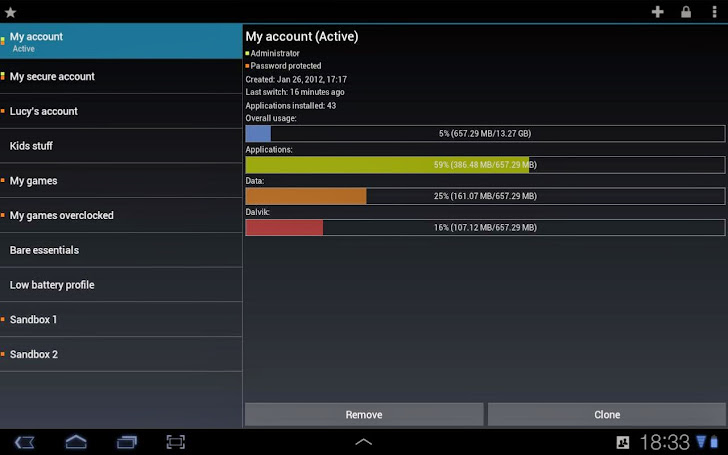
SwitchMe is an Android app that allows you to have two separate WhatsApp accounts on a single Android device, but this app requires your Android smartphone be rooted.
Now, Here's the deal:
Switchme multiple account app allows you to log in and out of multiple user spaces however it needs root access to do this. However, users cannot access the other profile from their current profile because each account within the multiple profiles will have its settings, applications, and data.
Follow these simple steps to go:
Step 1: Root your Android device.
Step 2: Make sure that you have WhatsApp app installed on your smartphone.
Step 3: Install SwitchMe Multiple accounts on your smartphone.
Step 4: Run SwitchMe Multiple accounts, it will ask for Superuser request that you need to grant.
Step 5: Now create a user profile with your name in SwitchMe app. This profile will be an administrator account containing all the current apps and settings, and will also reflect your WhatsApp profile that is already installed on your smartphone.
Step 6: Now create another profile using a different name by tapping on the Create Profile button in SwitchMe app, and then choose the Switch option by selecting this account.
Step 7: Now your smartphone will restart automatically and once it is ready to use, install official WhatsApp again from Google Play Store and register it for the different phone number. That is it.
Congratulations!
Unlike multi-user feature in Android Lollipop, the Free version of SwitchMe allows you to enjoy only 2 WhatsApp accounts on one single phone. However, SwitchMe's paid account allows you to run multiple WhatsApp accounts.
METHOD 3: USING OGWhatsApp
OGWhatsApp is an Android app that allows you to use two separate WhatsApp accounts on your single Android device without any need to root your Android device.
While running your normal WhatsApp account on your smartphone, you can follow some simple steps (below) in order to run a different WhatsApp account on the OGWhatsApp.
Follow these simple steps to go:
Step 1: Take a complete backup of your WhatsApp data and restore it.
Step 2: Delete all the WhatsApp data by going to Settings>apps>WhatsApp>Clear Data.
Step 3: Rename the /sdcard/WhatsApp directory to /sdcard/OGWhatsApp. You can use any file manager for Android to do this task, or from Windows.
Step 4: Uninstall your original WhatsApp app from your Android device.
Step 5: Now install OGWhatsApp in your Android smartphone.
Step 6: Once installed, remember to verify your old number that was previously registered with the original WhatsApp to OGWhatsApp. That is it.
Step 7: Now re-install the official WhatsApp for your other number from the play store.
Note: OGWhatsApp application for multiple WhatsApp account is not available now. So you can Choose any of the remaining two methods to run 2 WhatsApp in one mobile phone.
I have made available solutions for both users who want to use multiple WhatsApp accounts on their smartphone without rooting their Android device and with rooting their Android device respectively.
Go and enjoy WhatsApping!
गूगल टैग्स: 2 एक फोन डाउनलोड में WhatsApp, एक फोन एपीके में दो WhatsApp, दोहरी WhatsApp एप्लिकेशन, दो सिम फोन में 2 WhatsApp का उपयोग कैसे करें, कैसे उपयोग करने के लिए 2 ogwhatsapp बिना एक मोबाइल में WhatsApp, दोहरी whatsapp एपीके, दोहरी WhatsApp एप्लिकेशन डाउनलोड , दोहरी सिम डाउनलोड whatsapp,
कैसे अपने एंड्रॉइड फोन पर एकाधिक व्हाट्सएट खाते को चलाने के लिए (एक फोन में दो WhatsApp)
कितने WhatsApp खाते चलाने के लिए
व्हाट्सएप इन दिनों सबसे लोकप्रिय और आमतौर पर इस्तेमाल किया इंस्टेंट मैसेजिंग ऐप में से एक है और इसकी सादगी और इंटरफ़ेस का उपयोग करने में आसान है, इसलिए उपयोगकर्ता बिना किसी परेशानी के इसका उपयोग कर सकते हैं।
अब तक, हमारे सभी लोग हमारे स्मार्टफोन में व्हाट्सएप हैं I यद्यपि व्हाट्सएप में प्रत्येक और सब कुछ काफी आसान है, लेकिन "क्या सबसे ज्यादा परेशान करने वाला हिस्सा है जो आप में आया था?"
मेरे लिए यह:
एक एकल मोबाइल फोन में दो व्हाट्सएप खाते का उपयोग कैसे करें?
यदि आप अपने मोबाइल फोन में ड्यूल सिम चलाते हैं, तो आप अपने दो अलग टेलीफोन नंबरों के लिए दो अलग व्हाट्सएप खाते का आनंद ले सकते हैं। यही है ना
हालांकि, यह वह जगह है जहां व्हाट्सएप अपने उपयोगकर्ताओं पर सीमाएं डालती है। व्हाट्सएप उपयोगकर्ता अपने मोबाइल उपकरणों पर एक से अधिक व्हाट्सएप खाते का इस्तेमाल नहीं कर सकते।
आप शायद सोच रहे हैं:
"मैं वास्तव में काम करने वाली इस समस्या का उत्कृष्ट समाधान कैसे प्राप्त करूं?"
आज, मैं आपको आपकी समस्या का एक भी नहीं बल्कि कई समाधान पेश कर रहा हूं जो आपको एक फोन में दो व्हाट्सएप खातों को चलाने की अनुमति देगा।
विधि 1: एंड्रॉइड लॉलीपॉप फ़ोनों में मल्टी-यूज़ का उपयोग करें
यदि आप एक एंड्रॉइड फोन पर 2 व्हाट्सएप खाते चलाने के लिए चाहते हैं, तो आप एंड्रॉइड लॉलीपॉप ऑपरेटिंग सिस्टम द्वारा दी गई मल्टी-यूजर फीचर का उपयोग कर सकते हैं, इसमें साइनाोजेन ओएस और अन्य कस्टम रोम शामिल हैं।
शुरू करने के लिए इन सरल चरणों का पालन करें:
चरण 1: एंड्रॉइड लॉलीपॉप-आधारित स्मार्टफ़ोन में बहु-उपयोगकर्ता जोड़ें इसके लिए, बस सेटिंग पर जाएं और उपयोगकर्ता पर क्लिक करें और फिर उपयोगकर्ता जोड़ें।
चरण 2: एक नया उपयोगकर्ता बनाने के बाद, एक नया उपयोगकर्ता खाता सेटअप करने के लिए पूर्ण विवरण प्रदान करें
चरण 3: अधिसूचना बार नीचे खींचकर और नए यूजर आइकन पर क्लिक करके नए उपयोगकर्ता पर स्विच करें।
चरण 4: एक बार नया उपयोगकर्ता चालू हो गया, आपको डिफ़ॉल्ट फ़ोन सेटिंग्स के साथ एक नया फोन इंटरफ़ेस प्रदान किया जाएगा।
चरण 5: अब, नए यूजर मोड में व्हाट्सएप इंस्टॉल करें।
चरण 6: व्हाट्सएप डाउनलोड हो जाने के बाद, सभी विवरण दर्ज करें, और वह यह है।
बधाई! आपने सफलतापूर्वक स्थापित किया है 2 एक एकल फोन में WhatsApp खातों को किसी अन्य कस्टम रोम की स्थापना या स्थापित करने के बिना
बहु उपयोगकर्ता सुविधा के साथ, आप अपने एकल एंड्रॉइड डिवाइस पर कई व्हाट्सएप खाते का आनंद ले सकते हैं।
विधि 2: एकाधिक खातों को चलाने के लिए स्विस का प्रयोग करें
SwitchMe-बहु-खातों
SwitchMe एक एंड्रॉइड ऐप है जो आपको एक एकल एंड्रॉइड डिवाइस पर दो अलग-अलग व्हाट्सएप खाते प्रदान करने की अनुमति देता है, लेकिन इस ऐप को आपके एंड्रॉइड स्मार्टफोन को रूट किया जाना चाहिए।
अब, यह सौदा है:
स्विचमे मल्टीपल अकाउंट ऐप आपको एकाधिक यूजर स्पेस में लॉग इन करने और बाहर करने की सुविधा देता है, लेकिन इसके लिए यह रूट एक्सेस की आवश्यकता है। हालांकि, उपयोगकर्ता अपनी प्रोफ़ाइल से अन्य प्रोफाइल तक नहीं पहुंच सकते क्योंकि एकाधिक प्रोफाइल में प्रत्येक खाते में इसकी सेटिंग्स, एप्लिकेशन और डेटा होगा।
जाने के लिए इन सरल चरणों का पालन करें:
चरण 1: अपने एंड्रॉइड डिवाइस को रूट करें
चरण 2: सुनिश्चित करें कि आपके स्मार्टफ़ोन पर आपके पास व्हाट्सएप एप स्थापित है।
चरण 3: अपने स्मार्टफ़ोन पर स्विचमे मल्टीपल अकाउंट स्थापित करें।
चरण 4: चलाएं स्विच करें मल्टीपल अकाउंट्स, यह सुपरशुसर अनुरोध मांगेगा कि आपको अनुदान की आवश्यकता है।
चरण 5: अब SwitchMe ऐप में अपने नाम के साथ उपयोगकर्ता प्रोफ़ाइल बनाएं यह प्रोफाइल एक प्रशासक खाता होगा जिसमें सभी मौजूदा एप्लिकेशन और सेटिंग्स शामिल होंगी, और यह आपके व्हाट्सएप प्रोफ़ाइल को प्रतिबिंबित करेगा जो पहले से ही आपके स्मार्टफोन पर इंस्टॉल हो चुका है।
चरण 6: अब SwitchMe ऐप में प्रोफ़ाइल बनाएं बटन पर दोहन करके एक अलग नाम का उपयोग करके एक और प्रोफ़ाइल बनाएं, और फिर इस खाते को चुनकर स्विच विकल्प चुनें।
चरण 7: अब आपका स्मार्टफोन स्वचालित रूप से पुनरारंभ हो जाएगा और एक बार इसे उपयोग करने के लिए तैयार हो जाएगा, Google Play Store से आधिकारिक व्हाट्सएप को स्थापित करें और उसे अलग-अलग फ़ोन नंबर के लिए पंजीकृत करें। बस इतना ही।
बधाई!
एंड्रॉइड लॉलीपॉप में बहु-उपयोगकर्ता सुविधा के विपरीत, स्विचमे के मुफ्त संस्करण आपको एकल फोन पर केवल 2 व्हाट्सएप खाते का आनंद ले सकते हैं। हालांकि, स्विचमे के पेड अकाउंट आपको कई व्हाट्सएप खाते चलाने की अनुमति देता है।
विधि 3: ओग वॉट्सएप का प्रयोग
ओग वॉट्सैप एक एंड्रॉइड ऐप है जो आपको अपने एंड्रॉइड डिवाइस को जड़ने के लिए बिना किसी एक की आवश्यकता के अपने दो अलग-अलग व्हाट्सएप खाते का उपयोग करने की अनुमति देता है।
अपने स्मार्टफ़ोन पर अपना सामान्य व्हाट्सएप खाते चलते हुए, आप ओजीवाट्सएप पर एक अलग व्हाट्सएप खाते चलाने के लिए कुछ सरल चरणों का अनुसरण कर सकते हैं (नीचे)
जाने के लिए इन सरल चरणों का पालन करें:
चरण 1: अपने व्हाट्सएप डाटा का एक पूर्ण बैकअप लें और इसे पुनर्स्थापित करें।
चरण 2: सेटिंग> ऐप्स> व्हाट्सएप> साफ़ डेटा पर जाकर सभी व्हाट्सएप डेटा हटाएं
चरण 3: / sdcard / WhatsApp निर्देशिका का नाम बदलें / sdcard / OGWhatsApp आप एंड्रॉइड के लिए यह कार्य करने के लिए या विंडोज से किसी भी फाइल मैनेजर का उपयोग कर सकते हैं।
चरण 4: अपने एंड्रॉइड डिवाइस से अपने मूल व्हाट्सएप एप को अनइंस्टॉल करें।
चरण 5: अब ओग क्या स्थापित करें
googal taigs: 2 ek phon daunalod mein whatsapp, ek phon epeeke mein do whatsapp, doharee whatsapp eplikeshan, do sim phon mein 2 whatsapp ka upayog kaise karen, kaise upayog karane ke lie 2 ogwhatsapp bina ek mobail mein whatsapp, doharee whatsapp epeeke, doharee whatsapp eplikeshan daunalod , doharee sim daunalod whatsapp,
kaise apane endroid phon par ekaadhik vhaatset khaate ko chalaane ke lie (ek phon mein do whatsapp)
kitane whatsapp khaate chalaane ke lie
vhaatsep in dinon sabase lokapriy aur aamataur par istemaal kiya instent maisejing aip mein se ek hai aur isakee saadagee aur intarafes ka upayog karane mein aasaan hai, isalie upayogakarta bina kisee pareshaanee ke isaka upayog kar sakate hain.
ab tak, hamaare sabhee log hamaare smaartaphon mein vhaatsep hain i yadyapi vhaatsep mein pratyek aur sab kuchh kaaphee aasaan hai, lekin "kya sabase jyaada pareshaan karane vaala hissa hai jo aap mein aaya tha?"
mere lie yah:
ek ekal mobail phon mein do vhaatsep khaate ka upayog kaise karen?
yadi aap apane mobail phon mein dyool sim chalaate hain, to aap apane do alag teleephon nambaron ke lie do alag vhaatsep khaate ka aanand le sakate hain. yahee hai na
haalaanki, yah vah jagah hai jahaan vhaatsep apane upayogakartaon par seemaen daalatee hai. vhaatsep upayogakarta apane mobail upakaranon par ek se adhik vhaatsep khaate ka istemaal nahin kar sakate.
aap shaayad soch rahe hain:
"main vaastav mein kaam karane vaalee is samasya ka utkrsht samaadhaan kaise praapt karoon?"
aaj, main aapako aapakee samasya ka ek bhee nahin balki kaee samaadhaan pesh kar raha hoon jo aapako ek phon mein do vhaatsep khaaton ko chalaane kee anumati dega.
vidhi 1: endroid loleepop fonon mein maltee-yooz ka upayog karen
yadi aap ek endroid phon par 2 vhaatsep khaate chalaane ke lie chaahate hain, to aap endroid loleepop opareting sistam dvaara dee gaee maltee-yoojar pheechar ka upayog kar sakate hain, isamen sainaaojen oes aur any kastam rom shaamil hain.
shuroo karane ke lie in saral charanon ka paalan karen:
charan 1: endroid loleepop-aadhaarit smaartafon mein bahu-upayogakarta joden isake lie, bas seting par jaen aur upayogakarta par klik karen aur phir upayogakarta joden.
charan 2: ek naya upayogakarta banaane ke baad, ek naya upayogakarta khaata setap karane ke lie poorn vivaran pradaan karen
charan 3: adhisoochana baar neeche kheenchakar aur nae yoojar aaikan par klik karake nae upayogakarta par svich karen.
charan 4: ek baar naya upayogakarta chaaloo ho gaya, aapako difolt fon setings ke saath ek naya phon intarafes pradaan kiya jaega.
charan 5: ab, nae yoojar mod mein vhaatsep instol karen.
charan 6: vhaatsep daunalod ho jaane ke baad, sabhee vivaran darj karen, aur vah yah hai.
badhaee! aapane saphalataapoorvak sthaapit kiya hai 2 ek ekal phon mein whatsapp khaaton ko kisee any kastam rom kee sthaapana ya sthaapit karane ke bina
bahu upayogakarta suvidha ke saath, aap apane ekal endroid divais par kaee vhaatsep khaate ka aanand le sakate hain.
vidhi 2: ekaadhik khaaton ko chalaane ke lie svis ka prayog karen
switchhmai-bahu-khaaton
switchhmai ek endroid aip hai jo aapako ek ekal endroid divais par do alag-alag vhaatsep khaate pradaan karane kee anumati deta hai, lekin is aip ko aapake endroid smaartaphon ko root kiya jaana chaahie.
ab, yah sauda hai:
svichame malteepal akaunt aip aapako ekaadhik yoojar spes mein log in karane aur baahar karane kee suvidha deta hai, lekin isake lie yah root ekses kee aavashyakata hai. haalaanki, upayogakarta apanee profail se any prophail tak nahin pahunch sakate kyonki ekaadhik prophail mein pratyek khaate mein isakee setings, eplikeshan aur deta hoga.
jaane ke lie in saral charanon ka paalan karen:
charan 1: apane endroid divais ko root karen
charan 2: sunishchit karen ki aapake smaartafon par aapake paas vhaatsep ep sthaapit hai.
charan 3: apane smaartafon par svichame malteepal akaunt sthaapit karen.
charan 4: chalaen svich karen malteepal akaunts, yah suparashusar anurodh maangega ki aapako anudaan kee aavashyakata hai.
charan 5: ab switchhmai aip mein apane naam ke saath upayogakarta profail banaen yah prophail ek prashaasak khaata hoga jisamen sabhee maujooda eplikeshan aur setings shaamil hongee, aur yah aapake vhaatsep profail ko pratibimbit karega jo pahale se hee aapake smaartaphon par instol ho chuka hai.
charan 6: ab switchhmai aip mein profail banaen batan par dohan karake ek alag naam ka upayog karake ek aur profail banaen, aur phir is khaate ko chunakar svich vikalp chunen.
charan 7: ab aapaka smaartaphon svachaalit roop se punaraarambh ho jaega aur ek baar ise upayog karane ke lie taiyaar ho jaega, googlai play storai se aadhikaarik vhaatsep ko sthaapit karen aur use alag-alag fon nambar ke lie panjeekrt karen. bas itana hee.
badhaee!
endroid loleepop mein bahu-upayogakarta suvidha ke vipareet, svichame ke mupht sanskaran aapako ekal phon par keval 2 vhaatsep khaate ka aanand le sakate hain. haalaanki, svichame ke ped akaunt aapako kaee vhaatsep khaate chalaane kee anumati deta hai.
vidhi 3: og votsep ka prayog
og votsaip ek endroid aip hai jo aapako apane endroid divais ko jadane ke lie bina kisee ek kee aavashyakata ke apane do alag-alag vhaatsep khaate ka upayog karane kee anumati deta hai.
apane smaartafon par apana saamaany vhaatsep khaate chalate hue, aap ojeevaatsep par ek alag vhaatsep khaate chalaane ke lie kuchh saral charanon ka anusaran kar sakate hain (neeche)
jaane ke lie in saral charanon ka paalan karen:
charan 1: apane vhaatsep daata ka ek poorn baikap len aur ise punarsthaapit karen.
charan 2: seting> aips> vhaatsep> saaf deta par jaakar sabhee vhaatsep deta hataen
charan 3: / sdchard / whatsapp nirdeshika ka naam badalen / sdchard / ogwhatsapp aap endroid ke lie yah kaary karane ke lie ya vindoj se kisee bhee phail mainejar ka upayog kar sakate hain.
charan 4: apane endroid divais se apane mool vhaatsep ep ko aninstol karen.
charan 5: ab og kya sthaapit karen
गूगल टैग्स: 2 एक फोन डाउनलोड में WhatsApp, एक फोन एपीके में दो WhatsApp, दोहरी WhatsApp एप्लिकेशन, दो सिम फोन में 2 WhatsApp का उपयोग कैसे करें, कैसे उपयोग करने के लिए 2 ogwhatsapp बिना एक मोबाइल में WhatsApp, दोहरी whatsapp एपीके, दोहरी WhatsApp एप्लिकेशन डाउनलोड , दोहरी सिम डाउनलोड whatsapp,
कैसे अपने एंड्रॉइड फोन पर एकाधिक व्हाट्सएट खाते को चलाने के लिए (एक फोन में दो WhatsApp)
कितने WhatsApp खाते चलाने के लिए
व्हाट्सएप इन दिनों सबसे लोकप्रिय और आमतौर पर इस्तेमाल किया इंस्टेंट मैसेजिंग ऐप में से एक है और इसकी सादगी और इंटरफ़ेस का उपयोग करने में आसान है, इसलिए उपयोगकर्ता बिना किसी परेशानी के इसका उपयोग कर सकते हैं।
अब तक, हमारे सभी लोग हमारे स्मार्टफोन में व्हाट्सएप हैं I यद्यपि व्हाट्सएप में प्रत्येक और सब कुछ काफी आसान है, लेकिन "क्या सबसे ज्यादा परेशान करने वाला हिस्सा है जो आप में आया था?"
मेरे लिए यह:
एक एकल मोबाइल फोन में दो व्हाट्सएप खाते का उपयोग कैसे करें?
यदि आप अपने मोबाइल फोन में ड्यूल सिम चलाते हैं, तो आप अपने दो अलग टेलीफोन नंबरों के लिए दो अलग व्हाट्सएप खाते का आनंद ले सकते हैं। यही है ना
हालांकि, यह वह जगह है जहां व्हाट्सएप अपने उपयोगकर्ताओं पर सीमाएं डालती है। व्हाट्सएप उपयोगकर्ता अपने मोबाइल उपकरणों पर एक से अधिक व्हाट्सएप खाते का इस्तेमाल नहीं कर सकते।
आप शायद सोच रहे हैं:
"मैं वास्तव में काम करने वाली इस समस्या का उत्कृष्ट समाधान कैसे प्राप्त करूं?"
आज, मैं आपको आपकी समस्या का एक भी नहीं बल्कि कई समाधान पेश कर रहा हूं जो आपको एक फोन में दो व्हाट्सएप खातों को चलाने की अनुमति देगा।
विधि 1: एंड्रॉइड लॉलीपॉप फ़ोनों में मल्टी-यूज़ का उपयोग करें
यदि आप एक एंड्रॉइड फोन पर 2 व्हाट्सएप खाते चलाने के लिए चाहते हैं, तो आप एंड्रॉइड लॉलीपॉप ऑपरेटिंग सिस्टम द्वारा दी गई मल्टी-यूजर फीचर का उपयोग कर सकते हैं, इसमें साइनाोजेन ओएस और अन्य कस्टम रोम शामिल हैं।
शुरू करने के लिए इन सरल चरणों का पालन करें:
चरण 1: एंड्रॉइड लॉलीपॉप-आधारित स्मार्टफ़ोन में बहु-उपयोगकर्ता जोड़ें इसके लिए, बस सेटिंग पर जाएं और उपयोगकर्ता पर क्लिक करें और फिर उपयोगकर्ता जोड़ें।
चरण 2: एक नया उपयोगकर्ता बनाने के बाद, एक नया उपयोगकर्ता खाता सेटअप करने के लिए पूर्ण विवरण प्रदान करें
चरण 3: अधिसूचना बार नीचे खींचकर और नए यूजर आइकन पर क्लिक करके नए उपयोगकर्ता पर स्विच करें।
चरण 4: एक बार नया उपयोगकर्ता चालू हो गया, आपको डिफ़ॉल्ट फ़ोन सेटिंग्स के साथ एक नया फोन इंटरफ़ेस प्रदान किया जाएगा।
चरण 5: अब, नए यूजर मोड में व्हाट्सएप इंस्टॉल करें।
चरण 6: व्हाट्सएप डाउनलोड हो जाने के बाद, सभी विवरण दर्ज करें, और वह यह है।
बधाई! आपने सफलतापूर्वक स्थापित किया है 2 एक एकल फोन में WhatsApp खातों को किसी अन्य कस्टम रोम की स्थापना या स्थापित करने के बिना
बहु उपयोगकर्ता सुविधा के साथ, आप अपने एकल एंड्रॉइड डिवाइस पर कई व्हाट्सएप खाते का आनंद ले सकते हैं।
विधि 2: एकाधिक खातों को चलाने के लिए स्विस का प्रयोग करें
SwitchMe-बहु-खातों
SwitchMe एक एंड्रॉइड ऐप है जो आपको एक एकल एंड्रॉइड डिवाइस पर दो अलग-अलग व्हाट्सएप खाते प्रदान करने की अनुमति देता है, लेकिन इस ऐप को आपके एंड्रॉइड स्मार्टफोन को रूट किया जाना चाहिए।
अब, यह सौदा है:
स्विचमे मल्टीपल अकाउंट ऐप आपको एकाधिक यूजर स्पेस में लॉग इन करने और बाहर करने की सुविधा देता है, लेकिन इसके लिए यह रूट एक्सेस की आवश्यकता है। हालांकि, उपयोगकर्ता अपनी प्रोफ़ाइल से अन्य प्रोफाइल तक नहीं पहुंच सकते क्योंकि एकाधिक प्रोफाइल में प्रत्येक खाते में इसकी सेटिंग्स, एप्लिकेशन और डेटा होगा।
जाने के लिए इन सरल चरणों का पालन करें:
चरण 1: अपने एंड्रॉइड डिवाइस को रूट करें
चरण 2: सुनिश्चित करें कि आपके स्मार्टफ़ोन पर आपके पास व्हाट्सएप एप स्थापित है।
चरण 3: अपने स्मार्टफ़ोन पर स्विचमे मल्टीपल अकाउंट स्थापित करें।
चरण 4: चलाएं स्विच करें मल्टीपल अकाउंट्स, यह सुपरशुसर अनुरोध मांगेगा कि आपको अनुदान की आवश्यकता है।
चरण 5: अब SwitchMe ऐप में अपने नाम के साथ उपयोगकर्ता प्रोफ़ाइल बनाएं यह प्रोफाइल एक प्रशासक खाता होगा जिसमें सभी मौजूदा एप्लिकेशन और सेटिंग्स शामिल होंगी, और यह आपके व्हाट्सएप प्रोफ़ाइल को प्रतिबिंबित करेगा जो पहले से ही आपके स्मार्टफोन पर इंस्टॉल हो चुका है।
चरण 6: अब SwitchMe ऐप में प्रोफ़ाइल बनाएं बटन पर दोहन करके एक अलग नाम का उपयोग करके एक और प्रोफ़ाइल बनाएं, और फिर इस खाते को चुनकर स्विच विकल्प चुनें।
चरण 7: अब आपका स्मार्टफोन स्वचालित रूप से पुनरारंभ हो जाएगा और एक बार इसे उपयोग करने के लिए तैयार हो जाएगा, Google Play Store से आधिकारिक व्हाट्सएप को स्थापित करें और उसे अलग-अलग फ़ोन नंबर के लिए पंजीकृत करें। बस इतना ही।
बधाई!
एंड्रॉइड लॉलीपॉप में बहु-उपयोगकर्ता सुविधा के विपरीत, स्विचमे के मुफ्त संस्करण आपको एकल फोन पर केवल 2 व्हाट्सएप खाते का आनंद ले सकते हैं। हालांकि, स्विचमे के पेड अकाउंट आपको कई व्हाट्सएप खाते चलाने की अनुमति देता है।
विधि 3: ओग वॉट्सएप का प्रयोग
ओग वॉट्सैप एक एंड्रॉइड ऐप है जो आपको अपने एंड्रॉइड डिवाइस को जड़ने के लिए बिना किसी एक की आवश्यकता के अपने दो अलग-अलग व्हाट्सएप खाते का उपयोग करने की अनुमति देता है।
अपने स्मार्टफ़ोन पर अपना सामान्य व्हाट्सएप खाते चलते हुए, आप ओजीवाट्सएप पर एक अलग व्हाट्सएप खाते चलाने के लिए कुछ सरल चरणों का अनुसरण कर सकते हैं (नीचे)
जाने के लिए इन सरल चरणों का पालन करें:
चरण 1: अपने व्हाट्सएप डाटा का एक पूर्ण बैकअप लें और इसे पुनर्स्थापित करें।
चरण 2: सेटिंग> ऐप्स> व्हाट्सएप> साफ़ डेटा पर जाकर सभी व्हाट्सएप डेटा हटाएं
चरण 3: / sdcard / WhatsApp निर्देशिका का नाम बदलें / sdcard / OGWhatsApp आप एंड्रॉइड के लिए यह कार्य करने के लिए या विंडोज से किसी भी फाइल मैनेजर का उपयोग कर सकते हैं।
चरण 4: अपने एंड्रॉइड डिवाइस से अपने मूल व्हाट्सएप एप को अनइंस्टॉल करें।
चरण 5: अब ओग क्या स्थापित करें
googal taigs: 2 ek phon daunalod mein whatsapp, ek phon epeeke mein do whatsapp, doharee whatsapp eplikeshan, do sim phon mein 2 whatsapp ka upayog kaise karen, kaise upayog karane ke lie 2 ogwhatsapp bina ek mobail mein whatsapp, doharee whatsapp epeeke, doharee whatsapp eplikeshan daunalod , doharee sim daunalod whatsapp,
kaise apane endroid phon par ekaadhik vhaatset khaate ko chalaane ke lie (ek phon mein do whatsapp)
kitane whatsapp khaate chalaane ke lie
vhaatsep in dinon sabase lokapriy aur aamataur par istemaal kiya instent maisejing aip mein se ek hai aur isakee saadagee aur intarafes ka upayog karane mein aasaan hai, isalie upayogakarta bina kisee pareshaanee ke isaka upayog kar sakate hain.
ab tak, hamaare sabhee log hamaare smaartaphon mein vhaatsep hain i yadyapi vhaatsep mein pratyek aur sab kuchh kaaphee aasaan hai, lekin "kya sabase jyaada pareshaan karane vaala hissa hai jo aap mein aaya tha?"
mere lie yah:
ek ekal mobail phon mein do vhaatsep khaate ka upayog kaise karen?
yadi aap apane mobail phon mein dyool sim chalaate hain, to aap apane do alag teleephon nambaron ke lie do alag vhaatsep khaate ka aanand le sakate hain. yahee hai na
haalaanki, yah vah jagah hai jahaan vhaatsep apane upayogakartaon par seemaen daalatee hai. vhaatsep upayogakarta apane mobail upakaranon par ek se adhik vhaatsep khaate ka istemaal nahin kar sakate.
aap shaayad soch rahe hain:
"main vaastav mein kaam karane vaalee is samasya ka utkrsht samaadhaan kaise praapt karoon?"
aaj, main aapako aapakee samasya ka ek bhee nahin balki kaee samaadhaan pesh kar raha hoon jo aapako ek phon mein do vhaatsep khaaton ko chalaane kee anumati dega.
vidhi 1: endroid loleepop fonon mein maltee-yooz ka upayog karen
yadi aap ek endroid phon par 2 vhaatsep khaate chalaane ke lie chaahate hain, to aap endroid loleepop opareting sistam dvaara dee gaee maltee-yoojar pheechar ka upayog kar sakate hain, isamen sainaaojen oes aur any kastam rom shaamil hain.
shuroo karane ke lie in saral charanon ka paalan karen:
charan 1: endroid loleepop-aadhaarit smaartafon mein bahu-upayogakarta joden isake lie, bas seting par jaen aur upayogakarta par klik karen aur phir upayogakarta joden.
charan 2: ek naya upayogakarta banaane ke baad, ek naya upayogakarta khaata setap karane ke lie poorn vivaran pradaan karen
charan 3: adhisoochana baar neeche kheenchakar aur nae yoojar aaikan par klik karake nae upayogakarta par svich karen.
charan 4: ek baar naya upayogakarta chaaloo ho gaya, aapako difolt fon setings ke saath ek naya phon intarafes pradaan kiya jaega.
charan 5: ab, nae yoojar mod mein vhaatsep instol karen.
charan 6: vhaatsep daunalod ho jaane ke baad, sabhee vivaran darj karen, aur vah yah hai.
badhaee! aapane saphalataapoorvak sthaapit kiya hai 2 ek ekal phon mein whatsapp khaaton ko kisee any kastam rom kee sthaapana ya sthaapit karane ke bina
bahu upayogakarta suvidha ke saath, aap apane ekal endroid divais par kaee vhaatsep khaate ka aanand le sakate hain.
vidhi 2: ekaadhik khaaton ko chalaane ke lie svis ka prayog karen
switchhmai-bahu-khaaton
switchhmai ek endroid aip hai jo aapako ek ekal endroid divais par do alag-alag vhaatsep khaate pradaan karane kee anumati deta hai, lekin is aip ko aapake endroid smaartaphon ko root kiya jaana chaahie.
ab, yah sauda hai:
svichame malteepal akaunt aip aapako ekaadhik yoojar spes mein log in karane aur baahar karane kee suvidha deta hai, lekin isake lie yah root ekses kee aavashyakata hai. haalaanki, upayogakarta apanee profail se any prophail tak nahin pahunch sakate kyonki ekaadhik prophail mein pratyek khaate mein isakee setings, eplikeshan aur deta hoga.
jaane ke lie in saral charanon ka paalan karen:
charan 1: apane endroid divais ko root karen
charan 2: sunishchit karen ki aapake smaartafon par aapake paas vhaatsep ep sthaapit hai.
charan 3: apane smaartafon par svichame malteepal akaunt sthaapit karen.
charan 4: chalaen svich karen malteepal akaunts, yah suparashusar anurodh maangega ki aapako anudaan kee aavashyakata hai.
charan 5: ab switchhmai aip mein apane naam ke saath upayogakarta profail banaen yah prophail ek prashaasak khaata hoga jisamen sabhee maujooda eplikeshan aur setings shaamil hongee, aur yah aapake vhaatsep profail ko pratibimbit karega jo pahale se hee aapake smaartaphon par instol ho chuka hai.
charan 6: ab switchhmai aip mein profail banaen batan par dohan karake ek alag naam ka upayog karake ek aur profail banaen, aur phir is khaate ko chunakar svich vikalp chunen.
charan 7: ab aapaka smaartaphon svachaalit roop se punaraarambh ho jaega aur ek baar ise upayog karane ke lie taiyaar ho jaega, googlai play storai se aadhikaarik vhaatsep ko sthaapit karen aur use alag-alag fon nambar ke lie panjeekrt karen. bas itana hee.
badhaee!
endroid loleepop mein bahu-upayogakarta suvidha ke vipareet, svichame ke mupht sanskaran aapako ekal phon par keval 2 vhaatsep khaate ka aanand le sakate hain. haalaanki, svichame ke ped akaunt aapako kaee vhaatsep khaate chalaane kee anumati deta hai.
vidhi 3: og votsep ka prayog
og votsaip ek endroid aip hai jo aapako apane endroid divais ko jadane ke lie bina kisee ek kee aavashyakata ke apane do alag-alag vhaatsep khaate ka upayog karane kee anumati deta hai.
apane smaartafon par apana saamaany vhaatsep khaate chalate hue, aap ojeevaatsep par ek alag vhaatsep khaate chalaane ke lie kuchh saral charanon ka anusaran kar sakate hain (neeche)
jaane ke lie in saral charanon ka paalan karen:
charan 1: apane vhaatsep daata ka ek poorn baikap len aur ise punarsthaapit karen.
charan 2: seting> aips> vhaatsep> saaf deta par jaakar sabhee vhaatsep deta hataen
charan 3: / sdchard / whatsapp nirdeshika ka naam badalen / sdchard / ogwhatsapp aap endroid ke lie yah kaary karane ke lie ya vindoj se kisee bhee phail mainejar ka upayog kar sakate hain.
charan 4: apane endroid divais se apane mool vhaatsep ep ko aninstol karen.
charan 5: ab og kya sthaapit karen
Comments
Post a Comment